
🎬 HOW TO MAKE AI VIDEOS FOR FREE USING YOUR PHONE! 🤖📱🔥
Do you want to create amazing AI videos without spending money? Are you interested in making funny videos, cinematic videos, cartoon videos, or videos for TikTok and Facebook? 🎥
Good news! 🎉 You can start creating AI videos using your smartphone, even if you don't have a camera or advanced editing skills.
In this article, I'll explain how beginners can get started with AI video creation.
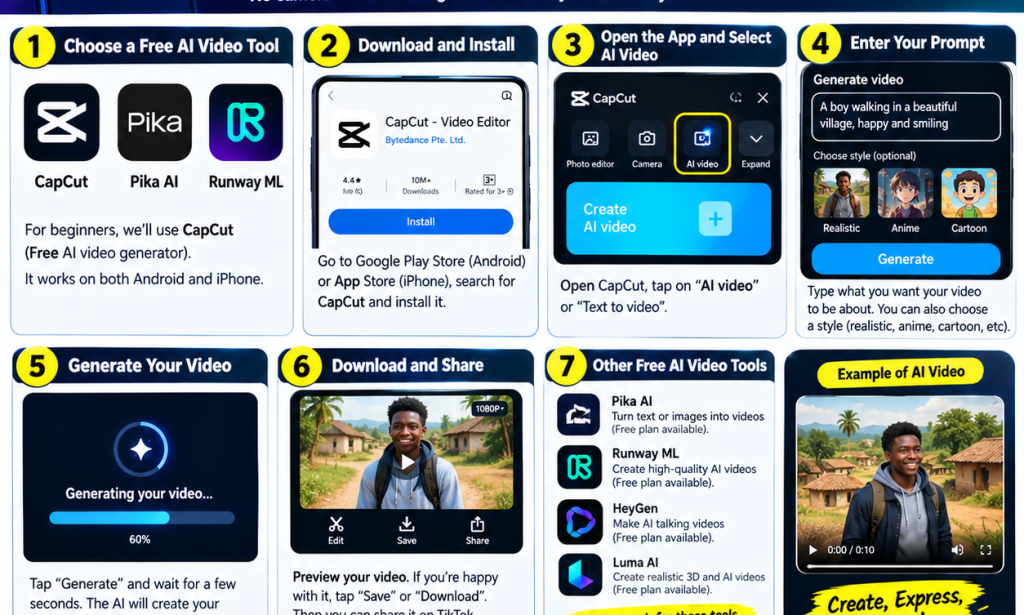
🚀 1. Choose an AI Video Creation Tool
There are several tools you can explore, including:
✅ CapCut — for video editing and available AI features.
✅ Pika — for generating videos from text or images.
✅ Runway — for AI-powered video creation.
✅ Luma AI — for AI video generation.
Note: Free access and available features can change. Some tools offer limited free credits, while others may require payment for certain features.
📱 2. Install or Open Your Chosen Tool
If you are using an Android phone:
Open the Google Play Store.
Search for the official app you want to use.
Install it if available, or visit the tool's official website.
Create an account if required.
Always use official apps and websites to protect your account.
✍️ 3. Write a Good AI Video Prompt
A prompt is a description of the video you want the AI to create.
For example, if you want a funny African comedy video, you could write:
Example prompt:
"Create a short, funny African village comedy video. A young man confidently tells his friends that he is very rich, but when the bill arrives, he suddenly pretends that his phone is switched off. Colourful village setting, natural expressions, cinematic camera movement, and a humorous ending."
You can change the description to create comedy skits, motivational videos, cartoons, or other creative content.
🎥 4. Generate Your Video
Follow these general steps:
Open your chosen AI video tool.
Find the text-to-video or image-to-video feature.
Enter your prompt or upload an image.
Choose the available style and video settings.
Tap Generate.
Wait for the video to finish processing.
The exact steps depend on the tool you choose.
📥 5. Save and Share Your Video
Once your video is ready, preview it and make any necessary edits.
You can then share it on:
TikTok
Facebook Reels
YouTube Shorts
WhatsApp Status
Instagram Reels
Remember to check the tool's terms for watermarks, usage limits, and commercial-use restrictions.
💡 6. Tips for Creating Better AI Videos
🔥 Keep your prompts clear and descriptive.
🔥 Start with short videos to learn how the tool works.
🔥 Experiment with different creative styles.
🔥 Add captions and sound effects where appropriate.
🔥 Create original content that entertains your audience.
🔥 Check whether the free plan allows you to export your video.
🎯 CONCLUSION
Creating AI videos can be an exciting way to express your creativity, entertain people, and develop your video-making skills.
You don't need to master everything at once. Start with one tool, practise writing prompts, and experiment with different ideas.
Your smartphone can be the beginning of your AI video creation journey! 🚀📱
📢 SHARE THIS ARTICLE!
Know someone who wants to create AI videos for free? Share this article with them and help them get started!


You must be logged in to post a comment.