
🎨 HOW TO DESIGN A PROFESSIONAL BUSINESS LOGO USING YOUR PHONE 📱🔥
Do you want to create a beautiful, professional logo for your business but don't know where to start? Don't worry! You can design an attractive business logo using your smartphone, even if you are a beginner. 🚀
A good logo helps people recognise your business, remember your brand, and understand the image you want to present to your customers.
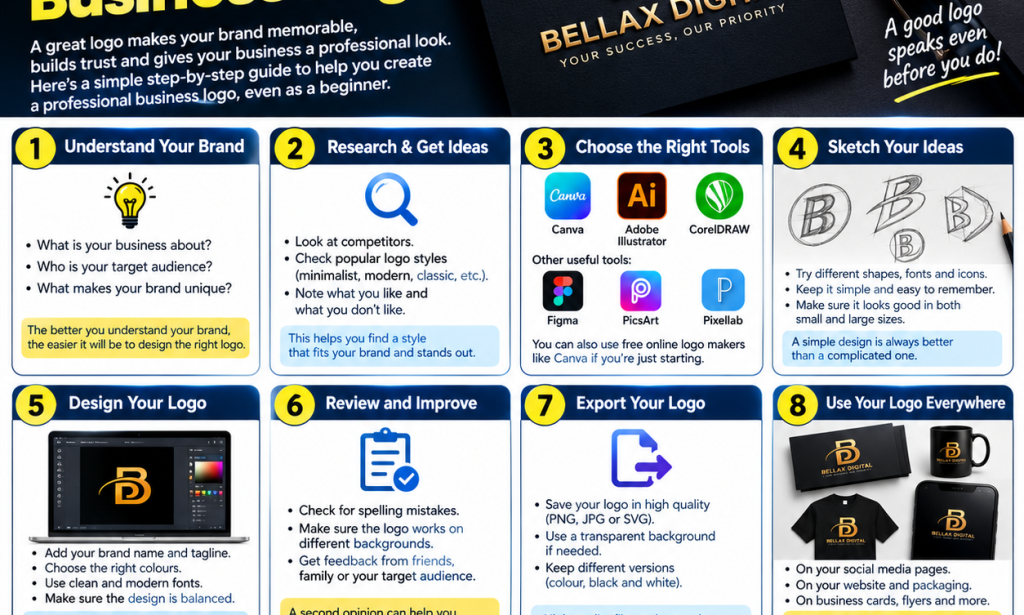
In this article, I'll show you 8 simple steps to design a professional business logo using your phone!
✅ 1. Understand Your Business
Before designing your logo, think about the business you want to represent.
Ask yourself:
What is the name of my business?
What products or services do I offer?
Who are my target customers?
What makes my business different?
Understanding your business will help you choose a logo style that suits your brand.
🎨 2. Choose Your Logo Colours
Colours can help communicate your brand's personality.
Here are some examples:
🔵 Blue: Often associated with trust and professionalism.
🟢 Green: Often associated with growth and nature.
⚫ Black: Can communicate elegance and sophistication.
🟡 Gold: Often used to create a premium or luxury appearance.
🔴 Red: Can communicate energy and excitement.
Choose two or three colours that work well together.
📱 3. Choose a Logo Design App
You don't need an expensive computer to get started. Several tools can help you create logos on your phone.
Some options include:
Canva: Beginner-friendly logo templates and design tools.
Adobe Express: Tools for creating graphics and brand designs.
PixelLab: Useful for text-based logo designs.
Adobe Illustrator: Advanced vector-design tools.
Some features may require payment, so check the available free options before starting.
✏️ 4. Sketch Your Ideas
Before designing, try drawing a few simple ideas on paper.
You could use:
Your business initials.
A simple symbol related to your business.
A creative arrangement of your business name.
A combination of text and a simple icon.
Tip: Keep your design simple. A logo should be easy to recognise and remember.
💻 5. Create Your Logo
Now it's time to bring your idea to life!
Follow these steps:
Open your chosen design app.
Create a new design.
Choose a suitable background.
Add your business name.
Select a clear, readable font.
Add a simple icon or symbol if necessary.
Adjust the colours, spacing, and alignment.
Review your design and make improvements.
Take your time and experiment with different ideas until you find a design that represents your business.
🔍 6. Review Your Design
Before finishing, check that your logo looks professional.
Ask yourself:
✅ Is the business name easy to read?
✅ Are the colours attractive and consistent?
✅ Does the design look good on a small screen?
✅ Is it easy to recognise?
✅ Does it look good on both light and dark backgrounds?
You can also ask friends or potential customers for feedback.
📥 7. Save Your Logo in High Quality
Once you are satisfied with your design, export it in a suitable format.
PNG: Useful for social media and images with transparent backgrounds.
JPG: Suitable for many ordinary digital uses.
SVG: Useful for scalable vector graphics when your design tool supports it.
Keep a high-quality original version so you can reuse your logo without having to redesign it.
🚀 8. Use Your Logo to Promote Your Business
After creating your logo, you can use it on:
📱 Facebook and WhatsApp business profiles.
📸 Instagram and TikTok pages.
💳 Business cards.
👕 Branded clothing.
🛍️ Product packaging.
🌐 Websites and promotional posters.
Using the same logo consistently helps people recognise your brand.
💡 BONUS: Tips for Creating a Professional Logo
🔥 Avoid using too many colours.
🔥 Choose fonts that are easy to read.
🔥 Avoid unnecessary decorations.
🔥 Make your logo original rather than copying another business.
🔥 Check that your chosen design does not unintentionally resemble an existing brand.
🔥 Keep a version without a background if you need to place the logo on different designs.
🔥 If you plan to use the logo commercially, check the licensing terms of any templates, fonts, and icons you use.
🎯 CONCLUSION
Designing a professional business logo doesn't have to be difficult. With a clear idea, the right tools, and a little creativity, you can create a logo that represents your business and helps people recognise your brand.
Remember, a great logo is not necessarily the most complicated one. A simple, memorable, and well-designed logo can make a strong impression.
Start practising today, develop your skills, and turn your creative ideas into professional designs!


You must be logged in to post a comment.