
Intro:
Does your iPhone hang and stop responding? Screen frozen, touch not working, apps not opening? Don't panic. You don't need to take it to a repairer. This is the easiest way to restart a hanging iPhone in 30 seconds.
What Is A Hanging iPhone?
When your iPhone hangs, it means the screen is frozen, you can't swipe, and no button is working. This happens when storage is full, too many apps are open, or the software has a small bug.
*Important: Forcing a restart will NOT delete your photos, videos, or WhatsApp chats.* It only restarts the phone.
*How To Restart iPhone 8, X, 11, 12, 13, 14, 15, 16:
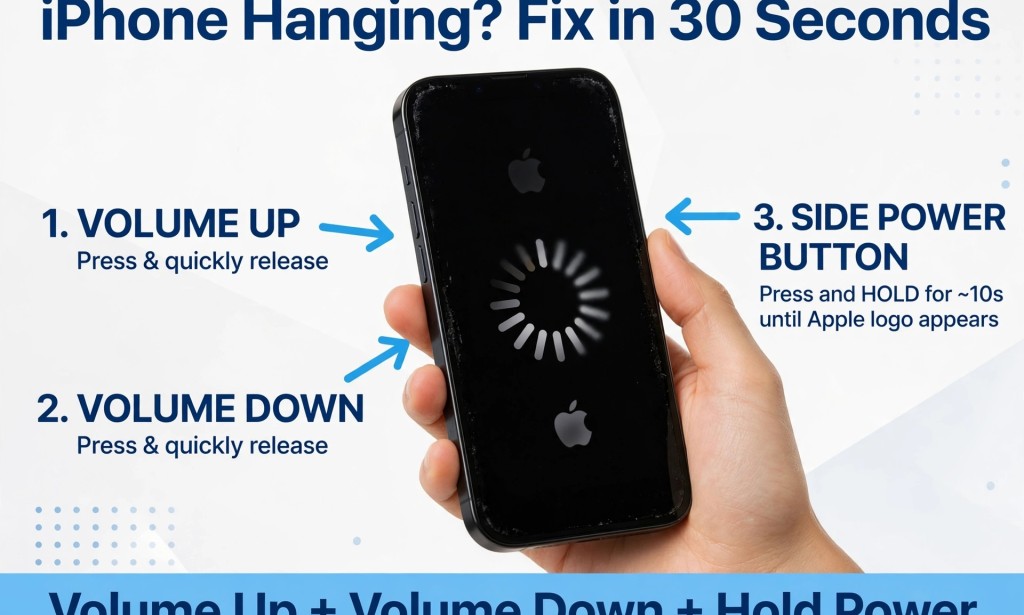
1. Press and quickly release the Volume Up button.
2. Press and quickly release the Volume Down button.
3. Press and HOLD the Side Power button on the right side.
4. Keep holding it, even when you see "Slide to Power Off", do NOT release it.
5. Release only when you see the Apple logo.
6. Wait for your iPhone to come on normally.
How To Restart iPhone 7 and 7 Plus:
1. Press and hold Volume Down + Side Power button together.
2. Hold for 10-15 seconds until you see the Apple logo.
*How To Restart iPhone 6s, 6, SE (Old Model):
1. Press and hold the Home button + Side Power button together.
2. Hold until the Apple logo appears.
*What To Do After Restarting To Stop It From Hanging Again:*
1. Delete old videos and photos or move them to Google Photos.
2. Close all apps running in the background.
3. Go to Settings > General > iPhone Storage and free up space.
4. Update your software: Settings > General > Software Update.
When Should You See A Repairer?
If your iPhone still hangs every day after restarting, your battery may be bad or your storage is too full. Visit an Apple store or trusted repairer.
Conclusion:
Restarting a hanging iPhone is very easy and takes less than 1 minute. Try it now and your phone will work again. Share this article with someone whose iPhone is always hanging!


You must be logged in to post a comment.