
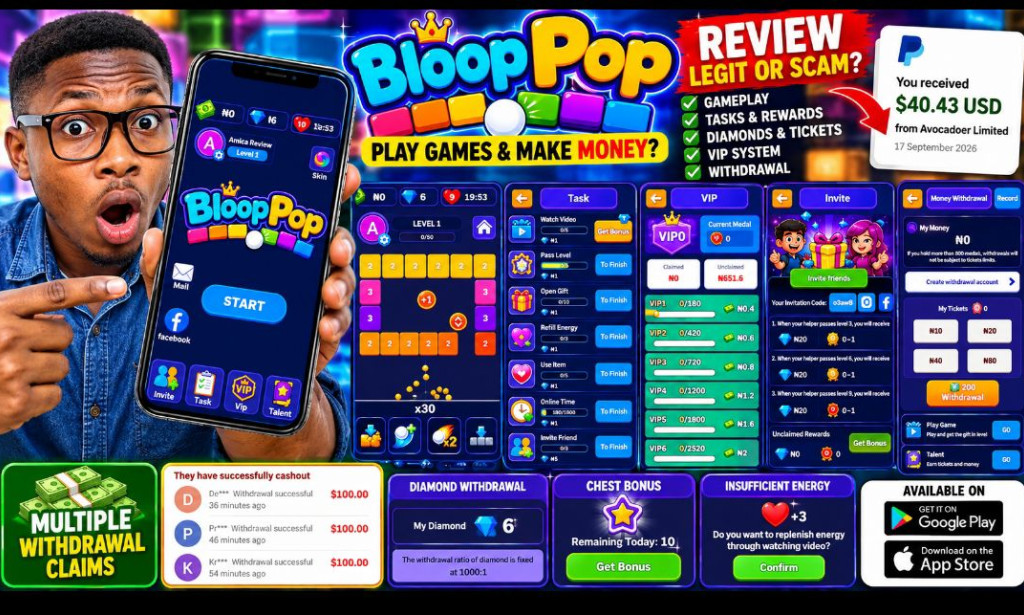
Bloop Pop Withdrawal & Gameplay Tutorial 2026
How to Play Bloop Pop, Earn Rewards, Collect Diamonds & Tickets and Understand Withdrawal
Updated by Amica Review
This article is an updated Bloop Pop tutorial based on the Bloop Pop interface and reward features previously examined by Amica Review, together with the latest publicly available information checked for this update.
Bloop Pop is primarily a brick-breaking game. However, the version examined also contains reward-related sections including money, diamonds, energy, Tasks, VIP, Invite and Talent.
Introduction
If you recently discovered Bloop Pop and are wondering how the game works, how to play the levels, how to collect rewards and how the withdrawal system works, this guide is for you.
I previously investigated Bloop Pop for Amica Review after seeing the game's combination of normal brick-breaking gameplay and reward features. Since then, the most common questions are still about how to play Bloop Pop, how to earn rewards, how to get tickets, how to collect diamonds and how to withdraw money.
Rather than simply saying that Bloop Pop pays or does not pay, I want to explain the process step by step and separate what can actually be seen in the application from claims that still need verification.
What Is Bloop Pop?
Bloop Pop is a mobile brick-breaking game. The official Google Play description explains that players aim and shoot a ball at blocks, break them, create combinations and progress through different challenges.
The game also includes colorful blocks, special blocks, boosters and increasingly difficult levels.
The public Google Play listing currently identifies Silent Gujranwala as the developer and shows that the application contains advertisements.
How to Start Playing Bloop Pop
Download Bloop Pop
Download Bloop Pop through the official Google Play listing whenever possible.
Avoid random websites offering modified versions of the application that promise unlimited diamonds, unlimited money or instant withdrawals.
Open the Application
After installation, open Bloop Pop and enter the game.
The home screen previously examined showed the player's profile, money balance, diamond balance and energy.
Understand the Main Menu
The Bloop Pop interface examined by Amica Review included several important sections.
- START - begins gameplay.
- Invite - provides access to the invitation/referral feature.
- Task - displays tasks that can provide rewards.
- VIP - displays the game's VIP-related progression.
- Talent - connects gameplay progress with talent points and rewards.
- Mail - provides access to messages or notifications.
How to Play Bloop Pop
The main Bloop Pop gameplay is based on shooting a ball toward numbered blocks.
Each block has a number representing how many hits may be required before the block disappears. Your objective is to choose a good shooting angle so that the ball can hit as many blocks as possible.
1. Aim Carefully
Before releasing the ball, look at the arrangement of the blocks.
Instead of simply shooting directly at the closest block, look for angles that allow the ball to bounce around the board and hit several blocks.
2. Look for Multiple Hits
A good shot can hit several blocks during the same turn.
This is especially useful when the blocks are arranged in a way that allows the ball to bounce between the top and side walls.
3. Use Boosters Carefully
The game includes special effects and boosters. When available, use them strategically rather than wasting them on an easy level.
4. Watch Your Energy
Energy is an important part of the reward-oriented version of Bloop Pop examined by Amica Review.
The screenshots previously examined showed an energy counter together with a countdown timer.
How Bloop Pop Energy Recovery Works
One of the features previously visible in Bloop Pop was an Insufficient Energy popup.
The popup offered additional energy after watching a video. The example examined showed a heart reward of +3 and a remaining recovery count.
This means players may be able to continue playing by using the available video-based recovery feature when energy runs out.
How to Complete Bloop Pop Tasks
The Task section is another important part of the reward system.
The task interface previously examined contained different activities that could be completed for rewards.
Depending on the current version, tasks may include activities such as watching videos, passing levels, opening gifts, recovering energy, using items, remaining online and inviting friends.
How Bloop Pop Chest Rewards Work
The Bloop Pop interface previously examined also displayed a chest reward popup.
The popup explained that after claiming the reward, players could upgrade their talent points and claim the corresponding rewards.
The screen also displayed a daily remaining count and a Get Bonus button connected to watching a video.
Why Are Chest Rewards Important?
Chest rewards appear to connect normal gameplay progress with the Talent system.
Therefore, completing levels may not only be about passing the level itself. It can also contribute to the wider reward progression inside the application.
How to Earn and Use Bloop Pop Diamonds
Diamonds are one of the virtual reward units visible in the Bloop Pop interface.
The previously examined account displayed 6 diamonds.
Diamonds should not automatically be treated as cash. They are an in-game reward balance until the application actually processes a withdrawal.
How Bloop Pop Tickets Work
Tickets are another important part of the withdrawal discussion.
Public user feedback on Google Play has included a report that a withdrawal required 200 tickets. However, this is an individual user report and should not be presented as a universally confirmed official rule without checking the current withdrawal page in the app.
How to Withdraw Money From Bloop Pop
This is the section most people are interested in.
The exact withdrawal interface and requirements can change between versions. Therefore, the safest approach is to follow the withdrawal information displayed inside your current Bloop Pop account.
Step 1: Open the Withdrawal Section
Log into your Bloop Pop account and look for the money or withdrawal section.
The previously examined interface showed a Money Withdrawal area.
Step 2: Check Your Money Balance
Before requesting a withdrawal, check how much money is displayed in your account.
In the screenshots previously examined by Amica Review, the money balance was displayed as ₦0.
This is important because the presence of a withdrawal button does not necessarily mean the account has enough balance to withdraw.
Step 3: Check Your Tickets
Check your available tickets.
Tickets may be part of the conditions associated with money withdrawals.
If your account does not meet the current ticket requirement, the withdrawal may not be available.
Step 4: Check the Minimum Withdrawal
Before submitting a request, carefully check the minimum withdrawal amount shown by your current version of the application.
The exact minimum cash amount was not established from the earlier screenshots examined for this review.
Step 5: Create or Connect a Withdrawal Account
If Bloop Pop asks you to create a withdrawal account, follow only the official in-app instructions.
Do not send your login password, bank PIN, OTP or wallet recovery phrase to another person claiming to be a Bloop Pop withdrawal agent.
Step 6: Select the Available Withdrawal Method
If a payment method is available, read the instructions carefully before submitting the request.
Do not assume that a payment method reported on Telegram, Facebook or YouTube is still available in the current application.
Step 7: Submit the Withdrawal
After confirming that your account meets all requirements, submit the withdrawal request through the official application.
Step 8: Keep Your Withdrawal Record
If the application provides a withdrawal record or transaction history, keep a screenshot or record of your request.
This can be useful if you later need to contact official support about a pending transaction.
What If My Bloop Pop Withdrawal Is Pending?
A pending withdrawal does not automatically mean that the payment has failed. It means the request has not yet reached a completed status.
Check the transaction record inside the application and look for any instructions or verification requirements.
If there is a genuine support channel provided by the developer, contact that channel rather than an unknown person claiming to represent Bloop Pop.
How Diamond Withdrawal Works
Bloop Pop also has a separate diamond-related reward system.
The previously examined interface displayed a Diamond Withdrawal section and showed a diamond balance.
However, the exact conversion rate, minimum withdrawal and payment method should always be confirmed in the current version of the app.
Understanding Bloop Pop VIP
The Bloop Pop home screen includes a VIP section.
VIP progression should not automatically be described as an investment plan. It may be an in-game progression or reward system.
Before paying for anything associated with VIP, check exactly what is being purchased and whether the payment is optional.
How the Bloop Pop Invite Feature Works
The Bloop Pop interface includes an Invite section.
This indicates that invitations are part of the reward ecosystem.
However, a specific referral percentage was not established from the screenshots previously examined. Therefore, this guide does not claim a fixed referral commission.
If you receive an invitation code or referral link, verify the exact reward conditions in the current app before promoting it.
How to Play Bloop Pop More Efficiently
If your objective is to progress through the game rather than simply tap randomly, the following gameplay approach can help you understand the mechanics.
Choose Better Shooting Angles
Look for angles that allow the ball to bounce multiple times.
Target High-Value Blocks
Blocks with higher numbers may require multiple hits. Look for opportunities to reduce several blocks at once.
Use Boosters Strategically
Do not immediately consume every booster. Save useful items for difficult formations where they can have a bigger effect.
Complete Available Tasks
After gameplay, check the Task section to see whether there are available activities that contribute to your reward progression.
Use Bonus Opportunities Carefully
If the app offers a video bonus, consider whether the reward is worth the time spent watching the advertisement.
Monitor Your Energy
Do not repeatedly watch videos for tiny rewards without considering the overall time involved. <

You must be logged in to post a comment.