
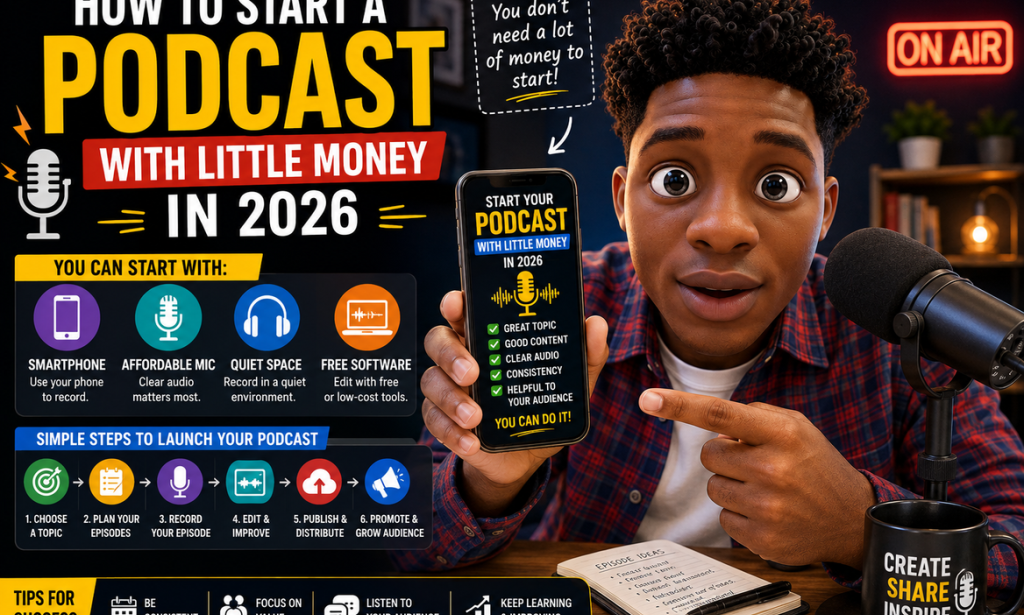
How to Start a Podcast With Little Money in 2026
A Complete Beginner's Guide
Starting a podcast can sound expensive.
You might imagine needing:
-
Expensive microphones
-
A professional recording studio
-
Audio engineers
-
Fancy cameras
-
Complicated editing software
-
A large audience
-
A big advertising budget
You don't.
In 2026, a beginner can start a podcast with equipment they may already own.
A smartphone, a quiet room, free or affordable software, and a good idea can be enough to produce your first episodes.
The biggest challenge isn't buying equipment.
It's creating something people actually want to listen to.
Your goal should be simple:
Choose a useful topic, create good conversations or stories, publish consistently, and improve with every episode.
Here's how to start.
Step 1: Decide Why You Want a Podcast
Start with your reason.
You might want to:
-
Teach
-
Tell stories
-
Build a personal brand
-
Interview interesting people
-
Share experiences
-
Promote a business
-
Build a community
-
Develop communication skills
-
Create another online income opportunity
Your reason will influence the type of podcast you create.
Step 2: Choose a Topic You Can Talk About Regularly
Don't choose a topic simply because it's popular.
Choose something you can realistically discuss for many episodes.
Possible topics include:
-
Business
-
Technology
-
Education
-
Personal development
-
Careers
-
Sports
-
Entertainment
-
Culture
-
Books
-
Creativity
-
Freelancing
-
Online business
-
Local stories
You don't need to know everything.
You need something worth exploring.
Step 3: Choose a Specific Angle
"Business" is extremely broad.
A more specific angle could be:
Online business for beginners
or:
How young entrepreneurs build small businesses
Specificity can make it easier to attract the right audience.
Step 4: Identify Your Target Listener
Ask:
Who is this podcast for?
For example:
-
Students
-
New entrepreneurs
-
Freelancers
-
Creators
-
Parents
-
Job seekers
-
Small-business owners
-
Technology enthusiasts
Knowing your listener helps you decide what to talk about.
Step 5: Identify Their Problems
Think about what your audience wants.
Maybe they want:
-
Better career opportunities
-
Business ideas
-
Practical technology advice
-
Motivation
-
Entertainment
-
Expert opinions
-
Education
Your episodes should provide something valuable to them.
Step 6: Choose Your Podcast Format
You don't need to use the same format every week.
Common formats include:
Solo Podcast
You speak directly to your audience.
Interview Podcast
You invite guests and ask questions.
Co-Host Podcast
You and another person discuss topics together.
Storytelling Podcast
You tell structured stories.
Educational Podcast
You teach a specific subject.
Choose a format that matches your strengths.
Step 7: Start With One Simple Format
Beginners often make things unnecessarily complicated.
You could start with:
One host + one topic + 20–30 minutes.
Once you're comfortable, experiment with interviews and other formats.
Step 8: Choose a Podcast Name
Your name should be:
-
Easy to remember
-
Easy to pronounce
-
Relevant
-
Easy to search
-
Flexible enough to grow
Avoid making the name so narrow that you're trapped if your interests change.
Step 9: Check the Name Before You Commit
Before using a name, check whether it is already strongly associated with another podcast, company, or brand.
Also check relevant social-media usernames where practical.
You want your show to be distinguishable.
Step 10: Write a Clear Description
Your podcast description should quickly explain:
What is the show about?
Who is it for?
What will listeners get from it?
For example:
A practical podcast for beginners who want to understand online business, freelancing, and digital skills without complicated jargon.
Keep it clear.
Step 11: Plan Your First 10 Episodes
Don't launch without knowing what you'll talk about next.
Create a list of at least 10 episode ideas.
For example:
-
How to Start an Online Business
-
Beginner Freelancing Mistakes
-
How to Find Your First Client
-
Building a Personal Brand
-
Useful Digital Skills
-
How to Create Digital Products
-
Managing Your Time
-
Using AI Responsibly
-
Building Multiple Income Streams
-
Lessons From Failed Projects
This gives you a starting roadmap.
Step 12: Choose an Episode Structure
A simple structure might be:
Introduction
Introduce the topic.
Main Discussion
Explain the important points.
Examples
Give practical examples.
Key Takeaways
Summarize the lesson.
Closing
Tell listeners what to expect next.
A structure helps prevent rambling.
Step 13: Write an Outline Instead of a Full Script
You don't always need to write every sentence.
Use bullet points.
For example:
Topic: Starting a Freelance Business
-
What freelancing means
-
Choosing a skill
-
Finding clients
-
Setting prices
-
Creating a portfolio
-
Common mistakes
-
First steps
This keeps the conversation natural.
Step 14: Practice Before Recording
Read your outline aloud.
Notice:
-
Awkward wording
-
Long explanations
-
Repeated points
-
Missing information
A few minutes of practice can improve the final recording.
Step 15: Start With the Equipment You Have
You don't need an expensive studio.
You can begin with:
-
Smartphone
-
Earphones with a microphone
-
Existing computer microphone
-
Affordable USB microphone
Upgrade later if the podcast proves worthwhile.
Step 16: Use Your Smartphone
A modern smartphone can record surprisingly usable audio when used correctly.
The most important factors are often:
-
Room acoustics
-
Microphone distance
-
Background noise
-
Speaking technique
Equipment can't completely fix a terrible recording environment.
Step 17: Find a Quiet Room
Choose a room away from:
-
Traffic
-
Loud appliances
-
Fans
-
Air conditioners
-
Television
-
Crowded areas
Record when the environment is quiet.
Step 18: Improve the Room
You don't need professional acoustic panels immediately.
Soft materials can help reduce reflections.
Try recording in a room with:
-
Curtains
-
Rugs
-
Furniture
-
Cushions
-
Soft furnishings
Avoid large empty rooms with lots of hard surfaces.
Step 19: Keep the Microphone Close Enough
A microphone that's too far away can make your voice sound distant.
But don't put it directly against your mouth.
Experiment with positioning.
Listen to a short test recording before recording the entire episode.
Step 20: Speak Clearly
Good podcasting isn't about having a perfect voice.
Focus on:
-
Clear pronunciation
-
Comfortable speed
-
Appropriate volume
-
Natural pauses
Don't rush.
Step 21: Record a Test
Before recording your full episode, record 30–60 seconds.
Listen carefully.
Check:
-
Volume
-
Background noise
-
Echo
-
Distortion
-
Breathing
-
Microphone position
Fix problems before recording everything.
Step 22: Record Separate Tracks When Possible
If you're interviewing someone remotely, separate audio tracks can make editing easier.
Not every beginner needs this.
But it's useful as your podcast becomes more advanced.
Step 23: Don't Chase Perfection
Your first episode probably won't sound like a major professional production.
That's normal.
Your first goal is to publish something clear and useful.
Improve over time.
Step 24: Edit Out Major Problems
You don't need to remove every breath.
Focus on obvious problems such as:
-
Long silences
-
Major mistakes
-
Repeated sections
-
Distracting background noise
-
Technical errors
Keep the conversation natural.
Step 25: Learn Basic Audio Editing
Learn how to:
-
Cut sections
-
Adjust volume
-
Remove unwanted noise
-
Add music when appropriate
-
Export the final file
You can start with beginner-friendly editing software.
Step 26: Don't Overuse Music
Music can add personality.
But your voice should remain the focus.
Keep background music appropriate and make sure you have the necessary rights to use it.
Step 27: Create Intro and Outro Audio
A short introduction can establish your podcast identity.
For example:
Welcome to [Podcast Name], where we explore practical ideas for building skills and opportunities online.
Keep it short.
Listeners generally want to get to the episode.
Step 28: Be Careful With Copyrighted Music
Don't simply download a popular song and put it in your podcast.
Use music you created, properly licensed music, or music available for podcast use under terms that permit your intended use.
Keep records of licenses when appropriate.
Step 29: Create Podcast Artwork
Your podcast needs recognizable artwork.
It should be:
-
Easy to read
-
Visually clear
-
Relevant to the topic
-
Recognizable at small sizes
Don't overcrowd the artwork with tiny text.
Step 30: Choose a Podcast Hosting Platform
A podcast host stores your audio and helps distribute it to podcast directories.
Compare platforms based on:
-
Price
-
Storage
-
Distribution
-
Analytics
-
Monetization options
-
Ease of use
You don't necessarily need the most expensive option.
Step 31: Understand Podcast Distribution
Publishing a podcast generally involves getting your show listed on podcast platforms and directories.
Your hosting service can often help with distribution.
Check each platform's current requirements.
Step 32: Publish Your First Episode
Don't wait until you have 100 episodes.
Publish your first episode.
Learn from it.
Then make episode two better.
Step 33: Consider Launching With Multiple Episodes
Some creators prefer launching with two or three episodes.
This gives a new listener more than one thing to hear.
It also helps demonstrate what the show is about.
Step 34: Create Strong Episode Titles
Avoid vague titles.
Instead of:
Episode 4
try:
How to Find Your First Freelance Client in 2026
The second title tells potential listeners exactly what they'll get.
Step 35: Write Useful Episode Descriptions
Include:
-
Main topic
-
Important points
-
Guest information
-
Useful resources
-
Relevant links
Make the description useful even for someone who hasn't listened yet.
Step 36: Use Chapters When Appropriate
For longer episodes, chapters can help listeners navigate the discussion.
For example:
00:00 Introduction
03:15 Choosing a Topic
10:20 Recording Equipment
18:40 Finding Your Audience
27:10 Promotion
This makes long episodes easier to use.
Step 37: Promote Each Episode
Publishing isn't the end.
Create promotional content from each episode.
You can share:
-
Short clips
-
Quotes
-
Key lessons
-
Behind-the-scenes content
-
Images
-
Short videos
One episode can generate several pieces of content.
Step 38: Use Short Video Clips
Video clips can introduce your podcast to people who don't know it yet.
Choose moments that:
-
Teach something
-
Tell an interesting story
-
Make people curious
-
Offer a useful opinion
Don't simply upload random sections.
Step 39: Write Social-Media Posts From Episodes
Turn an episode into a short educational post.
For example:
Three mistakes new freelancers make:
-
No portfolio
-
Unclear pricing
-
Poor follow-up
Then invite interested people to hear the full discussion.
Step 40: Invite Guests
Guests can bring:
-
Expertise
-
Stories
-
Different perspectives
-
New audiences
Choose guests because they add value, not simply because they have large follower counts.
Step 41: Prepare Guest Questions
Research guests before recording.
Prepare questions such as:
-
How did you get started?
-
What was your biggest mistake?
-
What would you do differently?
-
What advice would you give beginners?
Then listen carefully and ask follow-up questions.
Step 42: Make Guests Feel Comfortable
Explain the recording process before starting.
Tell guests:
-
How long the conversation will take
-
What topics you'll cover
-
Whether the episode will be edited
-
When it is expected to be published
Professional communication builds trust.
Step 43: Don't Make Every Episode an Advertisement
If every episode is just selling something, listeners may lose interest.
Teach.
Entertain.
Inform.
Tell stories.
Build trust.
Then introduce relevant offers naturally.
Step 44: Build a Community
Your listeners can become more than an audience.
Encourage:
-
Questions
-
Feedback
-
Comments
-
Topic suggestions
-
Listener stories
Pay attention to what people respond to.
Step 45: Ask Listeners What They Want
You don't have to guess every future topic.
Ask:
What should we discuss next?
Audience feedback can generate episode ideas.
Step 46: Track Your Podcast Analytics
Look at available metrics such as:
-
Downloads
-
Plays
-
Listener retention
-
Episode performance
-
Audience locations
-
Traffic sources
Don't obsess over every number.
Use analytics to learn.
Step 47: Find Your Best Topics
After publishing several episodes, look for patterns.
Which topics get more attention?
Which episodes receive more feedback?
Which clips perform well?
Create more content around topics your audience clearly values.
Step 48: Stay Consistent
Consistency doesn't necessarily mean publishing every day.
Choose a schedule you can maintain.
For example:
Weekly
or:
Every two weeks
A sustainable schedule is better than an ambitious schedule you abandon after one month.
Step 49: Learn From Every Episode
After publishing, ask:
-
What worked?
-
What sounded weak?
-
Did I ramble?
-
Was the topic useful?
-
Was the audio clear?
-
Did people respond?
Improve one or two things at a time.
Step 50: Consider Monetization Later
A podcast can eventually support several income opportunities.
Depending on your audience and niche, these may include:
-
Sponsorships
-
Advertising
-
Affiliate marketing
-
Digital products
-
Courses
-
Services
-
Memberships
-
Events
-
Consulting
-
Merchandise
Don't make monetization the only reason to create the show.
Build something people actually want first.
Example: Starting a Podcast With Almost No Budget
Imagine you want to create a podcast about online business for beginners.
You could start with:
Equipment: Smartphone and existing earphones
Recording location: Quiet room
Format: Solo episodes
Episode length: 15–25 minutes
Schedule: One episode per week
Promotion: Short clips and educational social posts
First goal: Publish 10 useful episodes
You can upgrade equipment after you understand what works.
A Simple 30-Day Podcast Launch Plan
Week 1 — Plan
Choose your topic.
Define your audience.
Choose your format.
Name the podcast.
Create 10 episode ideas.
Week 2 — Prepare
Create your artwork.
Write your podcast description.
Set up your recording system.
Record a test.
Outline your first three episodes.
Week 3 — Record
Record your first episodes.
Edit them.
Improve your audio.
Create descriptions.
Prepare promotional content.
Week 4 — Launch
Publish your first episode.
Share it.
Ask for feedback.
Publish your next episode.
Review what worked.
Plan the following episodes.
Common Mistakes to Avoid
Buying Too Much Equipment
Start with what you have.
Waiting for Perfect Audio
Aim for clear, listenable audio and improve over time.
Choosing a Topic You Can't Sustain
Make sure you have enough ideas.
Making Episodes Too Long
Length should serve the topic.
Talking Without Structure
Use an outline.
Ignoring Your Audience
Pay attention to questions and feedback.
Publishing Randomly
Choose a sustainable schedule.
Copying Another Podcast
Develop your own voice and perspective.
Using Copyrighted Content Without Permission
Use content you have the right to use.
Expecting Immediate Income
Audience-building takes time.
Final Thoughts
Starting a podcast in 2026 doesn't require a professional studio or a huge budget.
You can begin with equipment you already own, a quiet room, a useful topic, and a willingness to learn.
The most important investment isn't necessarily your microphone.
It's your idea, consistency, preparation, and ability to provide something valuable to listeners.
Start small.
Choose a clear audience.
Create useful episodes.
Improve your recording quality gradually.
Promote your best moments.
Listen to your audience.
Learn from your analytics.
And don't be afraid to publish your first imperfect episode.
Your podcast doesn't have to become famous overnight.
It simply needs to become better with every episode.

You must be logged in to post a comment.